GPU-Based Interactive Grass System
GPU-Driven Grass Rendering R&D using Compute Shader and DrawMeshInstancedIndirect in Unity URP
About this project
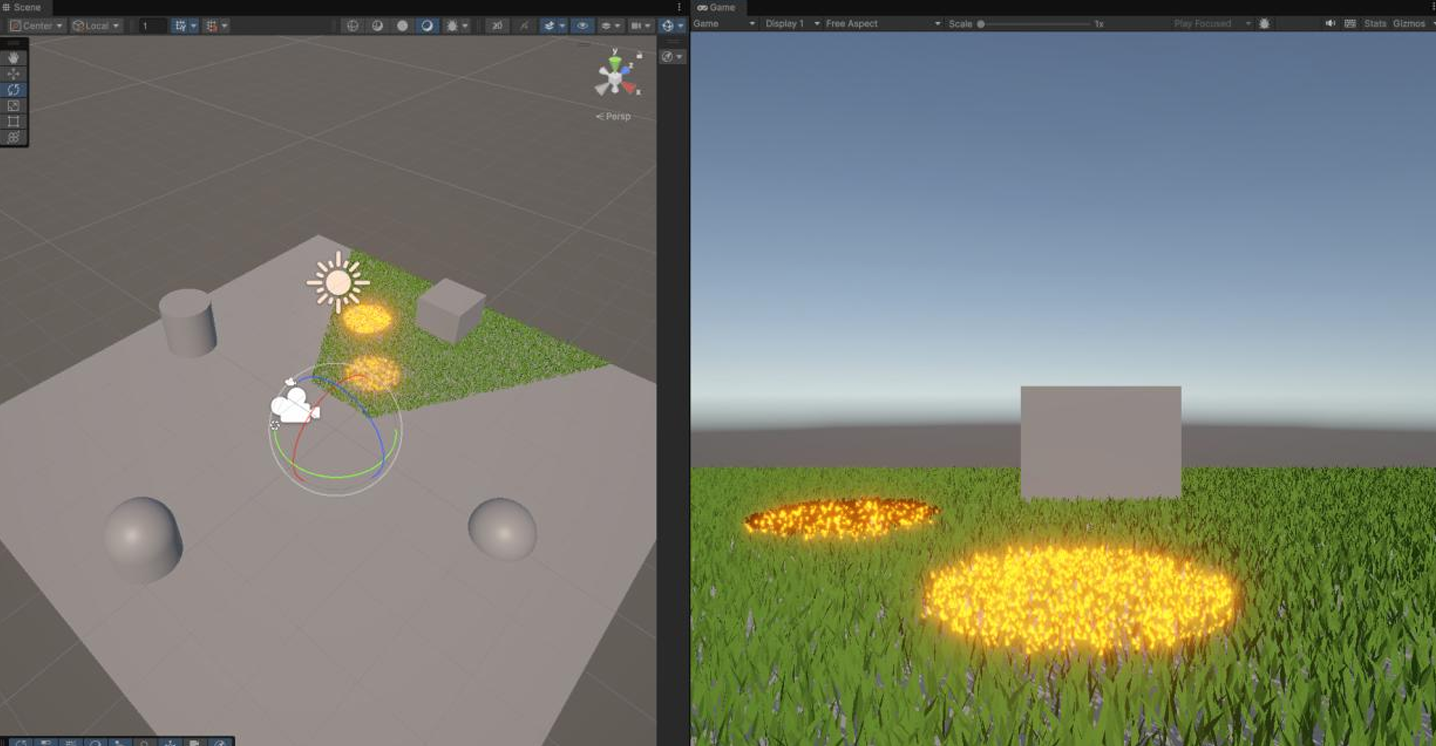
This project is a GPU-based interactive grass rendering R&D, implemented with Compute Shader and DrawMeshInstancedIndirect in Unity 6 URP.
Instead of updating or culling massive grass instances individually on the CPU, the pipeline performs state update, frustum culling, visible-instance list generation, and Indirect Draw entirely on the GPU.
A state machine — where grass burns in response to user input and regrows after being fully burnt for a certain time — is handled in the Compute Shader, and the render shader visualizes Burn / Char / Regrow states via dissolve, color bands, and height scaling.
Using RenderDoc, I verified ExecuteIndirect calls and instanceCount changes, confirming that the Compute-based culling and DrawMeshInstancedIndirect pipeline work as intended.
System Overview
GPU Driven Pipeline#
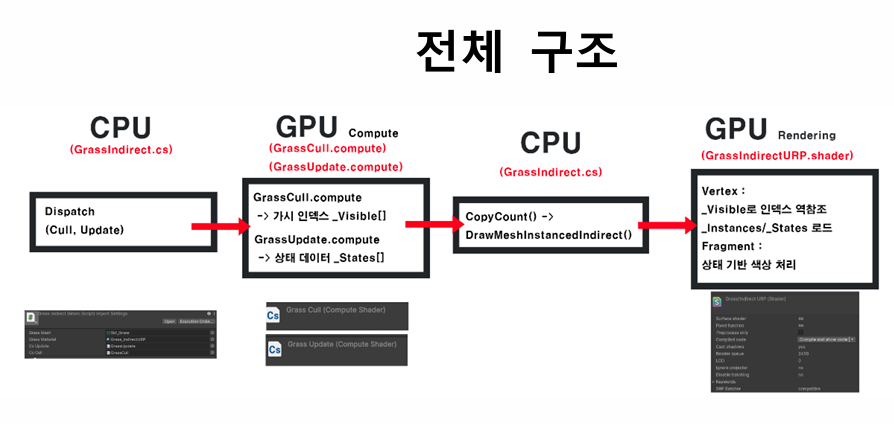
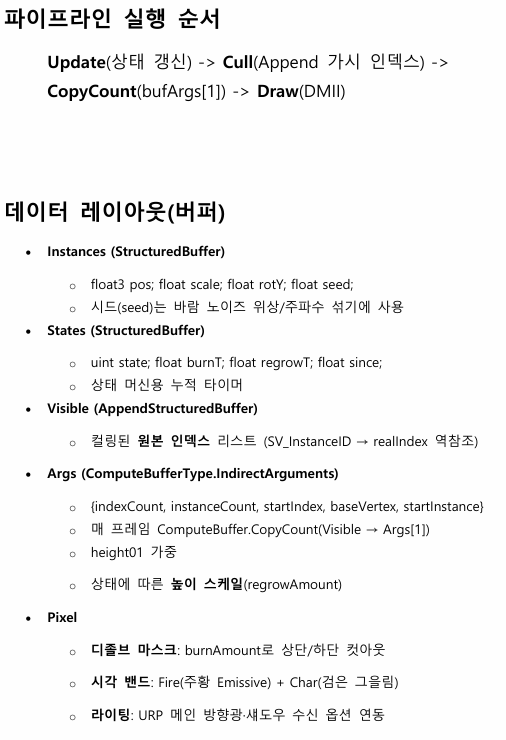
Instead of having the CPU iterate over every grass instance to handle state updates and culling, this system is designed so that the GPU selects visible grass and forwards the result to Indirect Draw.
The CPU does not perform per-instance computation; its role is limited to Compute Shader dispatch, parameter passing, and Draw calls.
Each stage's role:
| Stage | Role |
|---|---|
| Update | Update grass Alive / Burning / Burnt / Regrowing states |
| Cull | Select only grass instances visible to the camera frustum |
| CopyCount | Copy the visible buffer count into instanceCount of Indirect Args |
| Draw | Render only visible instances via DrawMeshInstancedIndirect |
GrassUpdate.computeupdates grass states, andGrassCull.computewrites only camera-visible instances into aVisibleAppend Buffer.
ThenCopyCountcopies the Visible Buffer count to the Indirect Args Buffer'sinstanceCount, andDrawMeshInstancedIndirectrenders only the visible instances.
Buffer Layout
GPU Buffer Structure#
The key part of this project is the separation of CPU data and GPU data.
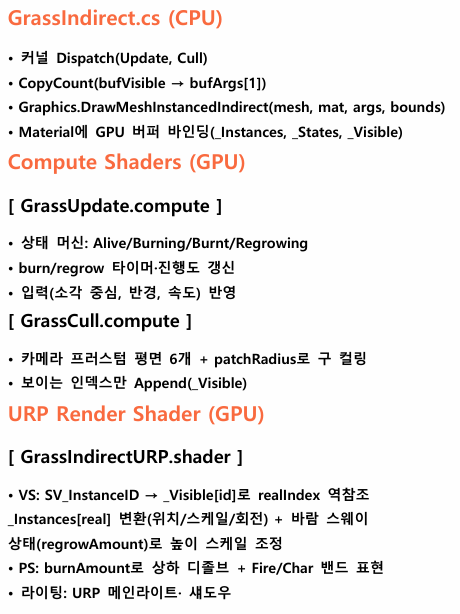
Per-grass position, rotation, scale, state, and timer data are kept in GPU buffers, and the render shader uses SV_InstanceID to dereference the actual instance data.
| Buffer | Type | Role |
|---|---|---|
| Instances | StructuredBuffer | Stores grass position, scale, rotation, seed |
| States | StructuredBuffer | Stores state values and burn/regrow timers |
| Visible | AppendStructuredBuffer | Stores indices of visible instances after culling |
| Args | IndirectArguments Buffer | Stores arguments for Indirect Draw |
The Visible buffer holds only the source indices of visible instances, not the actual instance data.
The render shader reads the Visible buffer with SV_InstanceID, and uses that value to look up Instances and States.
Culling results are stored in a separate Visible Append Buffer, and the render shader first reads the Visible buffer via SV_InstanceID, then dereferences the real source index.
This structure renders only culled instances while keeping per-instance Transform and State data on the GPU.
GPU Frustum Culling
Visibility Test via Compute Shader#
Culling every grass instance individually on the CPU each frame can become a CPU bottleneck.
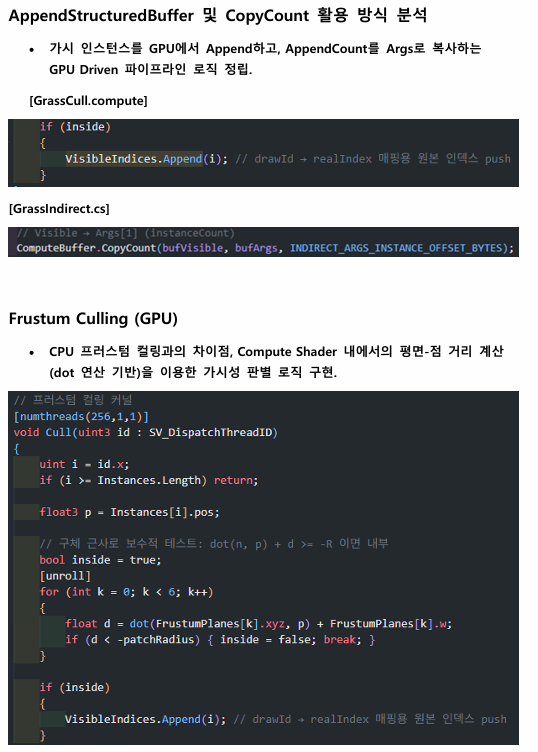
In this project, the six camera frustum planes are passed to a Compute Shader, and visibility is tested on the GPU using each instance's position and its patchRadius.
Before the Cull dispatch, the Visible buffer counter is reset, so only this frame's visible instances are appended.
CopyCountthen copies the appended count to the Args Buffer'sinstanceCount, so the CPU never computes how many instances to draw — that result is computed on the GPU and consumed directly by the Draw call.
DrawMeshInstancedIndirect
Understanding and Implementing Indirect Draw#
The usual DrawMeshInstanced builds the instance batch on the CPU and is limited in how many instances can be drawn per call.
By contrast, DrawMeshInstancedIndirect lets the GPU decide the instance count based on values stored in the Args Buffer.
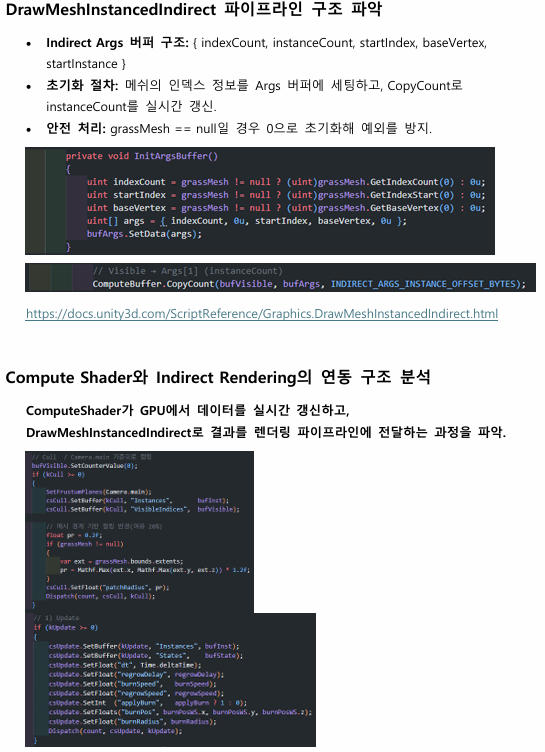
The Indirect Args Buffer layout is:
In this project, the mesh's index info is set into the Args Buffer at initialization, and each frame the Visible Buffer's Count is copied into Args[1] — instanceCount.
I built the DrawMeshInstancedIndirect Args Buffer structure manually, and copied the Visible Buffer's Append Count into Args[1] to update instanceCount in real time.
This way, only the grass count actually visible to the camera is reflected in each Indirect Draw.
RenderDoc Verification
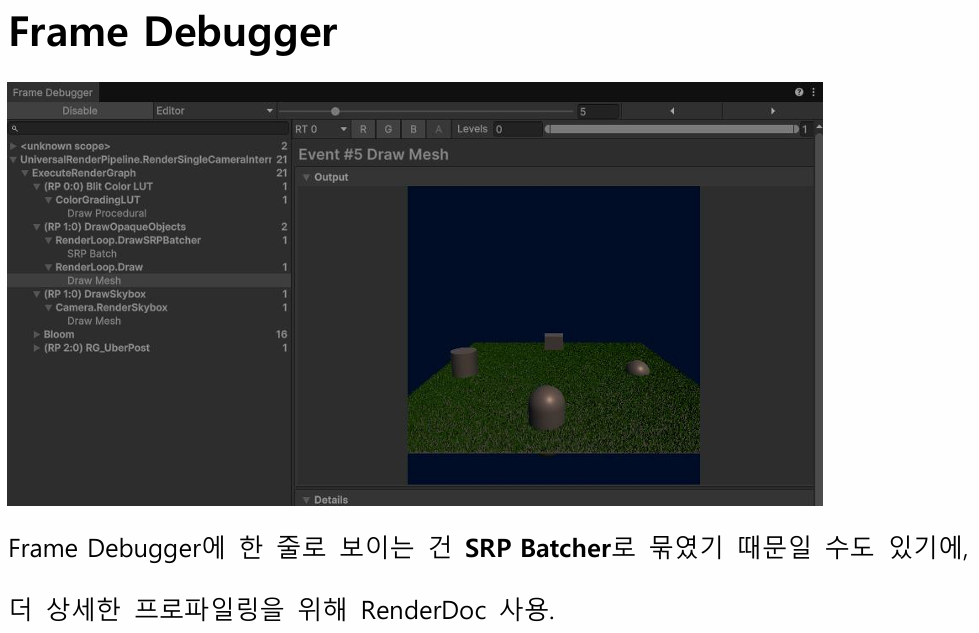
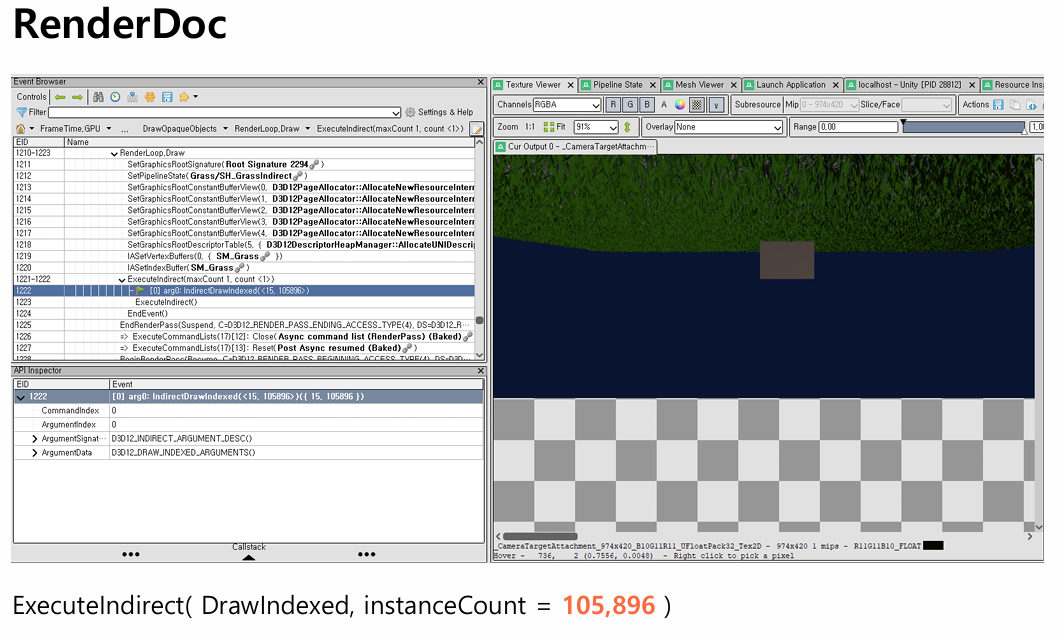
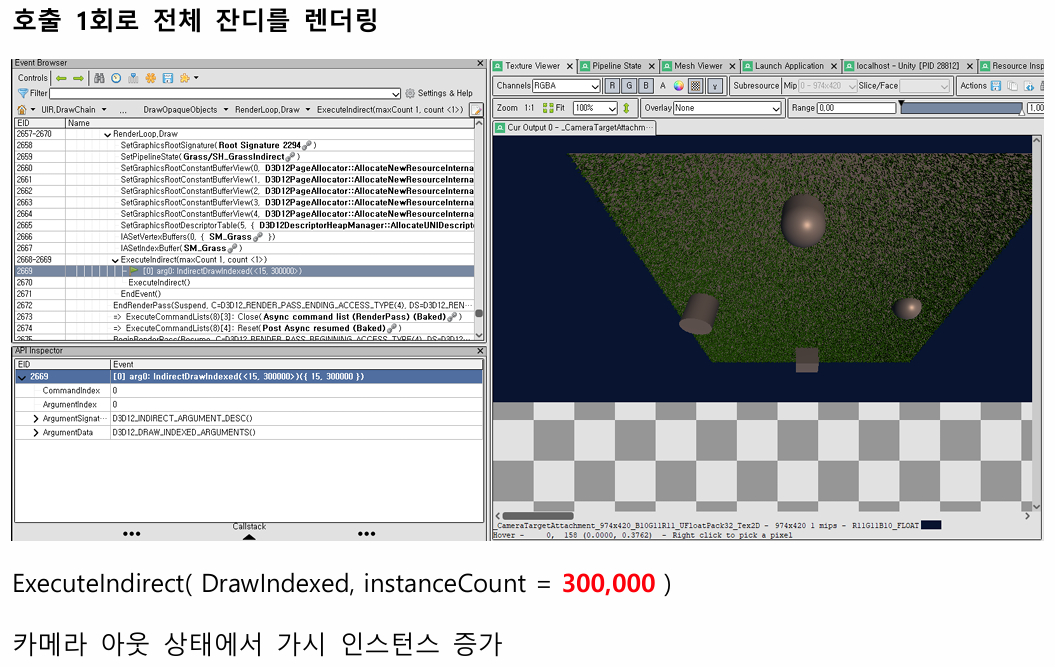
Because the Frame Debugger can show a Draw as a single line, I verified the actual GPU calls and instanceCount changes with RenderDoc.
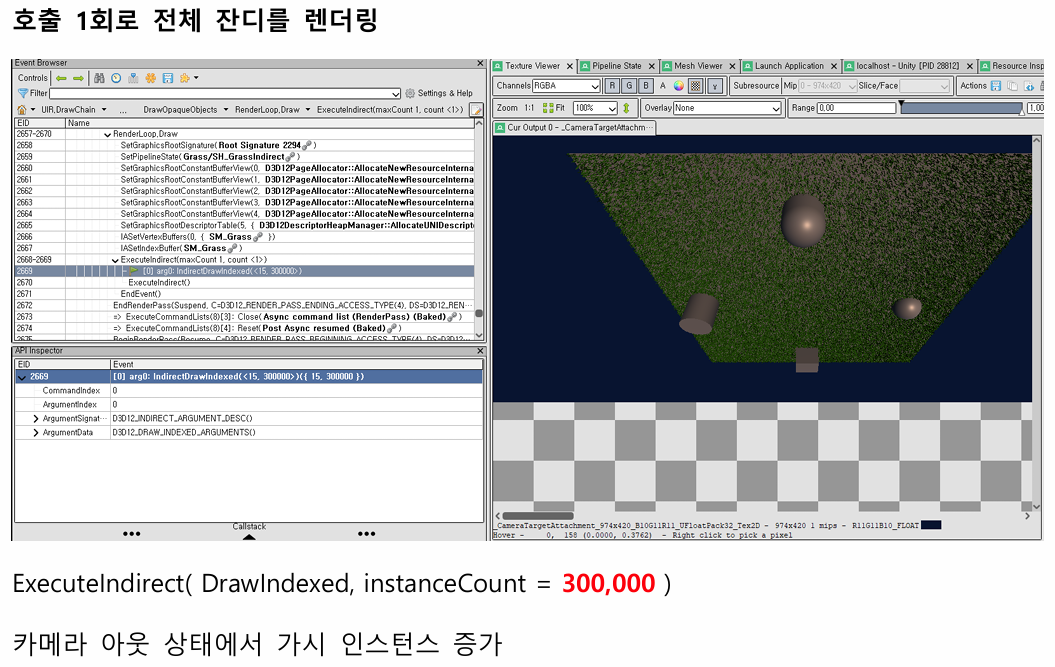
The test setup was 300,000 grass instances, and RenderDoc showed ExecuteIndirect calls.
Depending on the camera state, RenderDoc reported ExecuteIndirect(DrawIndexed, instanceCount = 105,896) or instanceCount = 300,000, confirming that the Compute-based frustum culling and DrawMeshInstancedIndirect pipeline work correctly.
Using RenderDoc, I verified the ExecuteIndirect calls and instanceCount changes.
Only grass within the camera frustum was written to the Visible Buffer, and that count was forwarded into the Indirect Args Buffer — confirming the Compute-based culling and DrawMeshInstancedIndirect pipeline are functioning correctly.
Interactive Grass State System
Burn / Burnt / Regrow State Machine#
Grass is not just a rendered object — it's designed with a state machine that responds to user input.
States are defined as follows:
| State | Description |
|---|---|
| Alive | Normal state |
| Burning | Currently on fire |
| Burnt | Fully burnt |
| Regrowing | Regrowing |
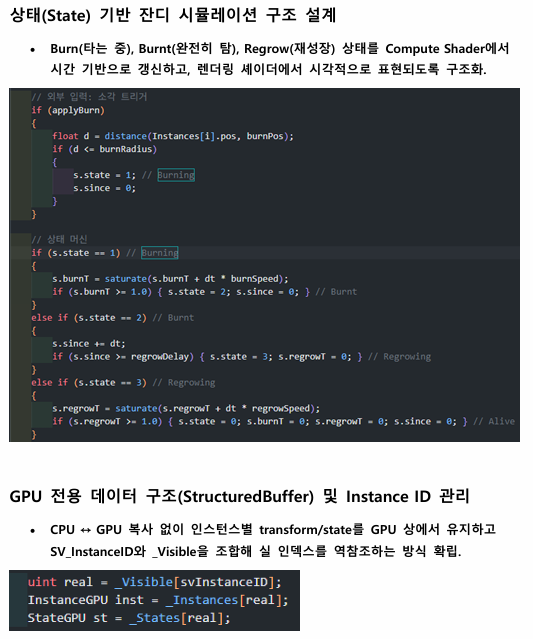
The distance between the input position and each grass instance is computed, and any grass within the radius transitions into the Burning state.
burnT then increases over time, and once fully burnt the state transitions to Burnt. After a delay it enters Regrowing, with regrowT increasing until it returns to Alive.
Grass interaction is handled by the state machine inside the Compute Shader.
Based on the input position and radius, grass enters the Burning state, and the burnT and regrowT timers cycle it through Burnt, Regrowing, and back to Alive.
These state values are passed to the render shader and drive grass height, dissolve, and Fire/Char visuals.
Burn / Regrow Visual Shader
State-driven Visual Representation#
The render shader visualizes grass state based on the values updated in the Compute Shader.
The main visual elements:
| Element | Description |
|---|---|
| burnAmount | Burning progress |
| regrowAmount | Regrowing progress |
| height01 | Height value based on grass UV.y |
| Fire Band | Orange emissive at the burning boundary |
| Char Band | Dark scorched look on burnt areas |
| Dissolve | Burning or vanishing areas handled via clip |
When grass burns, the dissolve progresses top-to-bottom, with a Fire Band at the boundary to give the burning impression.
Fully burnt areas are darkened with the Char Band, and during Regrow the height scale increases again to suggest the grass growing back.
The render shader receives burnAmount and regrowAmount from the Compute Shader and uses them to drive the grass visual state.
burnAmount drives the dissolve mask and the Fire/Char bands, while regrowAmount drives the grass height scale — visualizing the regrowth of burnt grass.
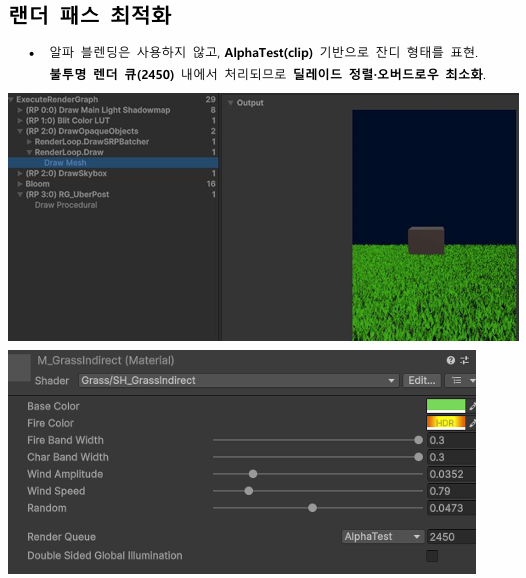
Instead of alpha blending, AlphaTest-based clip is used to represent the grass shape.
Wind Noise
Low-cost Wind Sway Noise#
Instead of heavy procedural noise like Perlin/Simplex, grass wind sway is implemented using a coordinate-hash-based pseudo-random number that mixes world position with a per-instance seed.
A low-resolution noise texture would also work, but for this R&D I tested a function-based wind modulation with no extra texture dependency.
References\
- Origin and variants of the coordinate-hash one-liner PRNG
shader - What's the origin of this GLSL rand() one-liner? - Stack Overflow\ - Random / noise functions for GLSL
shader - Random / noise functions for GLSL - Stack Overflow
Noise R&D
https://gksrudtlr2.tistory.com/335
https://thebookofshaders.com/11/?lan=kr
The random value is mixed with time and a per-instance seed so each grass blade has a different phase and amplitude of sway.
Also, the height01 value based on UV.y is used as a weight, so the base moves little and the tips sway more.
URP Render Pass
ForwardLit / ShadowCaster Pass Setup#
The render shader is structured with a ForwardLit pass and a ShadowCaster pass for URP.
Both passes reference the same _Instances, _States, and _Visible buffers, so screen rendering and shadow rendering use the same instance state.
Grass shape is handled with AlphaTest-based clip rather than Alpha Blending. This avoids Transparent Queue sorting and alpha-blending cost, reducing the transparent rendering burden under mass grass rendering.
Result
Implementation Results#
- GPU-based interactive grass system implemented in Unity 6 URP
- Tested with 300,000 grass instances
- Compute Shader-based state update implemented
- Compute Shader-based frustum culling implemented
- AppendStructuredBuffer + CopyCount + Indirect Args structure implemented
- GPU Driven Rendering pipeline implemented with DrawMeshInstancedIndirect
- ExecuteIndirect calls and instanceCount changes verified in RenderDoc
- Burn / Burnt / Regrow state-based interaction implemented
- Coordinate-hash-based low-cost Wind Noise implemented
- Tip-only sway via UV.y-based height01 weighting
- URP ForwardLit / ShadowCaster passes set up
- AlphaTest-based grass to avoid Transparent sorting cost
This project is a GPU-based interactive grass rendering R&D, implemented with Compute Shader and DrawMeshInstancedIndirect in Unity 6 URP.
Rather than controlling massive grass instances on the CPU, the pipeline performs state update, frustum culling, visible-instance list generation, and Indirect Draw entirely on the GPU.
A state machine — where grass burns in response to user input and regrows after being fully burnt for a certain time — is handled in the Compute Shader, and the render shader visualizes Burn / Char / Regrow states via dissolve and height scaling.
Wind sway is implemented with coordinate-hash-based pseudo-random numbers and per-instance seeds instead of heavy noise like Perlin/Simplex, and UV.y-based height01 weighting is applied so the tips sway more.
RenderDoc was used to verify the ExecuteIndirect calls and instanceCount changes, confirming that the Compute-based culling and DrawMeshInstancedIndirect pipeline work as intended.